

PC Nuovo: clean up and speed up your PC for free
Has your computer become slow, full and sluggish to start? PC Nuovo gets it back in shape in a few clicks: it removes junk files, leftovers from uninstalled programs and duplicates that eat your space. Free, no subscriptions and no ads inside the program.
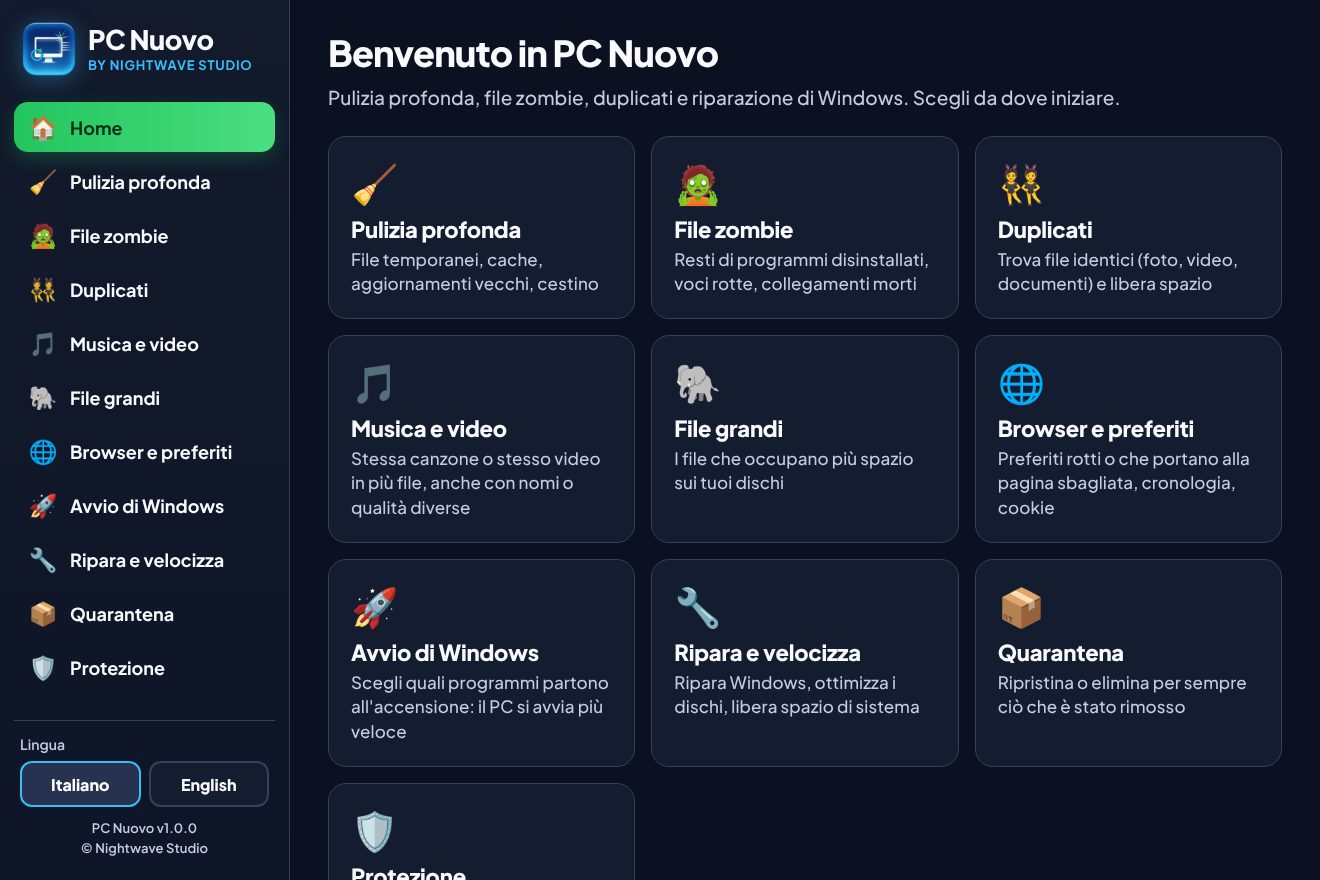
What PC Nuovo does
Deep cleaning
Temporary files, Windows Update cache, browser and graphics card caches, error reports, Recycle Bin. Often several GB.
Zombie files
Finds folders and registry entries left behind by badly uninstalled programs, broken shortcuts and orphaned services.
Duplicates
Compares the real content of files (not just the name) and finds photos, documents and archives copied several times, with image previews.
Duplicate music and videos
Recognises the same song or video even with a different name or quality, by really checking the video footage. Always keeps the best copy.
Large files
Shows the heaviest files on your drives, sorted by type: videos, disk images, archives, backups.
Browsers and bookmarks
Finds bookmarks that no longer work or now lead to a different site, and clears history and cookies when you want.
Faster startup
Tells you which programs start with Windows, who made them and which ones you can safely disable.
Repair Windows
System file check and repair, component cleanup, drive optimisation, hibernation and DNS: all in one click.
Deep cleaning, without the risk
- Nothing is deleted right away: removed files go to Quarantine and you can put them back with one click.
- Before the deepest cleanups it creates a Windows restore point.
- It recognises folders with valuable data (crypto wallets, saved games, chats, passwords) and never selects them on its own.
- Vital Windows folders are protected: the program cannot touch them.
- Every search can be stopped at any time with the Stop button.
How to install it
- Click "Download PC Nuovo for free" and open the PC-Nuovo-Setup.exe file.
- If Windows shows "Windows protected your PC", click "More info" and then "Run anyway". This happens with new programs that are not yet widespread.
- Confirm the permission request with "Yes": it is needed to clean system folders.
- Open PC Nuovo from the Desktop icon and start with "Deep cleaning".
Clean PC. Now protect it.
A clean PC is faster, but without serious protection it gets slow and at risk again within weeks: one wrong attachment is enough. Find the right antivirus for you in 1 minute, at the lowest price available today.
Take the free test →Frequently asked questions
- Is PC Nuovo really free?
- Yes, completely: no subscription, no paid version, no ads in the program. It is offered by Antivirus Scout.
- Can it delete my personal files?
- Automatic cleanups only touch temporary files and caches. Duplicates, large files and zombie files are chosen by you, and they go to Quarantine anyway, where you can restore them.
- Why does Windows say the program is not recognised?
- Windows warns about every new program that does not have many downloads yet. The file is the original one published by Nightwave Studio.
- Does it work on Windows 7 or 8?
- No, PC Nuovo is designed for Windows 10 and Windows 11.
- Does it replace an antivirus?
- No. PC Nuovo cleans and speeds up your PC, but it does not block viruses and scams. For that you need dedicated protection: our test helps you choose the right one.
PC Nuovo is developed by Nightwave Studio and offered for free by Antivirus Scout.